Showing posts with label CCR. Show all posts

Friday, April 27, 2012

Mini booklet Revamp

This is a Mini- Booklet I made same with using the one sheet of paper. I turned it on its side so that it "flipped up" to open. This way the pockets were on the side and I could slip in some tags. I was trying out new ideas, and I was itching to use the stamp "10 things" and this is how I put it to work. 


I LOVE how it turned out!!

For the inside I used my AP cartridge to cut out the "tags" and the hearts for the numbers.
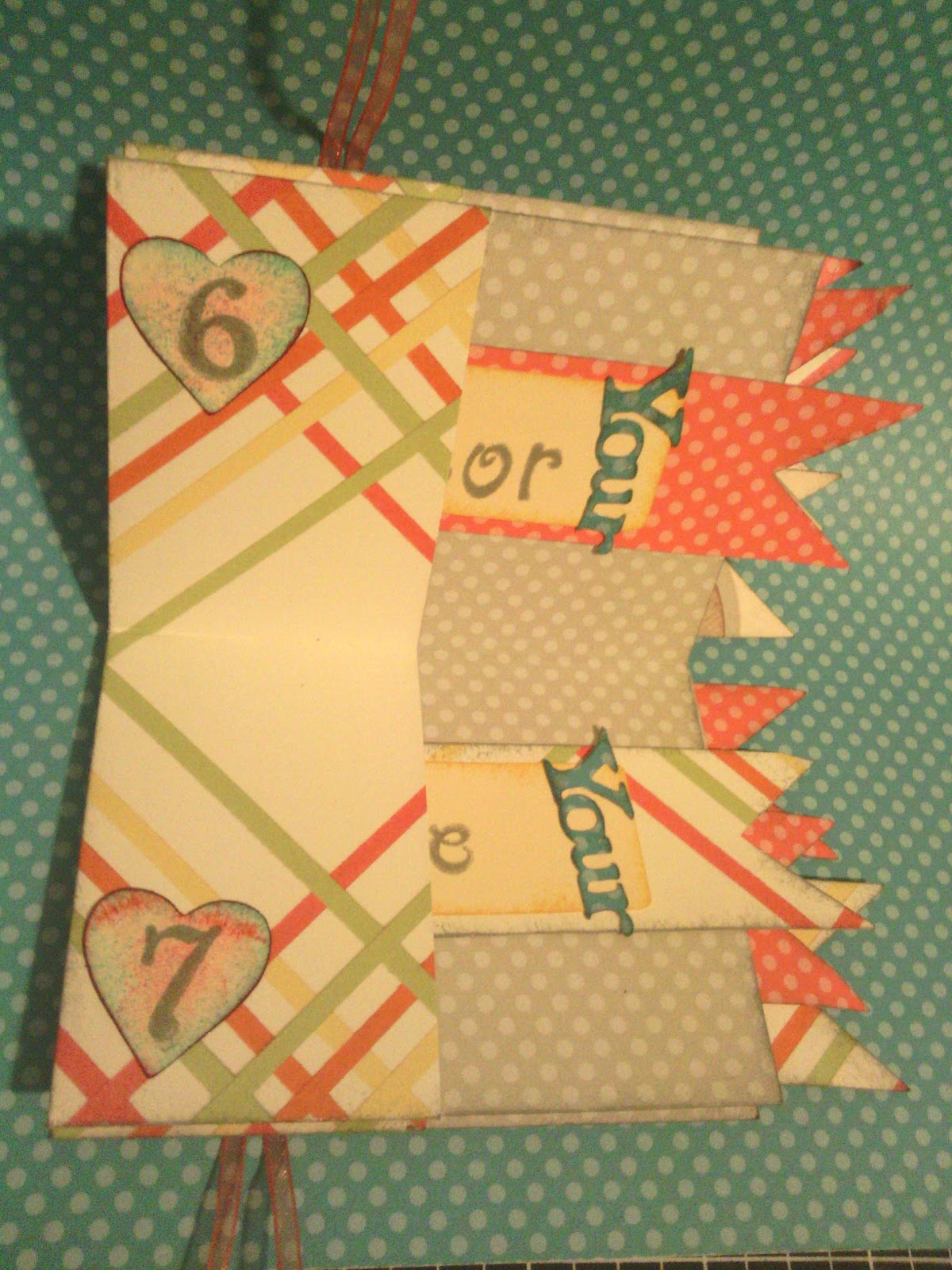
 Since the stamp is "10" things... and the booklet only has 8 pockets I had to double up on 2 pockets, but it worked out GREAT!
Here is a close up of a few of the tags I made. the word "your" was also cut out with the AP cartridge. I used the Cricut Craft Room (CCR) to weld the letters together. This way I only had to peel off individual words, rather than each individual letter...can you imagine!!

Finally I used a ribbon to hold it together, I glued it to the back and front covers and tied a bow. 
 Check out the video tutorial on how to create your own mini-booklet. It's posted under video tutorials OR in the previous Mini-Booklet post.

ENJOY!


Monday, April 16, 2012

It's a RED, WHITE, and BLUE kind of thing....

I got asked to put together rather quickly a "Fun, Unique, red, white and blue Invitation for a retirement party. This is what I came up with...

I used white daisy for the card it self.  I cut a 9" x 4 1/4" piece and scored it at 3 1/2".
I then folded it up at the score line and just glued the side edges to form the pocket. 

I stamped it with some swirls using Grey wool ink , also stamped on some red stars on the bottom using Holiday red ink. 

I cut out two squares a red square measuring 2 1/2" x 2 1/2" and a blue one measuring 2 1/4" x 2 1/4".  These were originally supposed to be centered one on top of each other in the middle of the white on the bottom, but I decided to go with this lay out instead. 

For the title I cut a white daisy card-stock into a 1 3/4" x 3/4" and stamped the sentiment on. 

I then Used my Cricut Art Philosophy to cut out a tag (pg 40)  with the shift key and tag key on. This will cut the  tag with the stars "Cut out"  I used the Cricut craft room to get the size I needed 5 1/4" x 2 1/4"

I used Indian corn blue ink on the tag to stamp the words, and holiday red ink for the stars. I cut out a tag same size just with out the (stars) cut-out, and glued it to the back to give me the color. 

For the bow I tied a knot in some royal blue ribbon and snipped the ends to size and used Glue dots to adhere it to the tag. 

 Final Product :)


Dont forget to "follow" me on here and get entered to win the A size stamp set "Always remember".


"Like" my facebook page and get an extra entry Click HERE.


Friday, April 13, 2012

playing with Cricut Craft Room

So today I decided to play round with my Cricut Craft Room (CCR) and so far I have to say that I really Like it!! We will see if I get to LOVE it.


Everything I made in this post was cut using the Art Philosophy Cartridge


I was trying to make some Lollipop covers for my Niece's Bday and I made a 2in tag with holes on each end. Turns out perfect width just not long enough. So I got this bright idea..." on the CCR you can just stretch the image" and VIOLA!! just like that I had perfect size Covers!! and I can arrange them on my mat perfectly side by side to fit more than I would if just cut straight from the cricut! :)


So after that I got to playing with it some more and thought lets try making a quick banner.... (why not).
So again used the CCR and used 5.5" triangles with the holes on each side on the top. I placed them side by side (one up and one down) as close as possible together... (a GREAT advantage from CCR). 


Then I cut Stars and arranged them the same way, kind like a puzzle where I tried to interlock them as close together as possible so more would fit on my mat. With in minutes I had my objects cut and I was ready to assemble!


I inked the edges of both triangles and stars. I used the 3d foam to stick the stars onto the triangle to give it some dimension.


I decided to spell my son's name out and just cut out some letters using the CCR in black and glued them onto the stars. 


Last but not least I strung on some sheer ribbon to tie it all together and VIOLA! done!


Not to shabby for first Banner... lol

Questions or comments just leave a post.